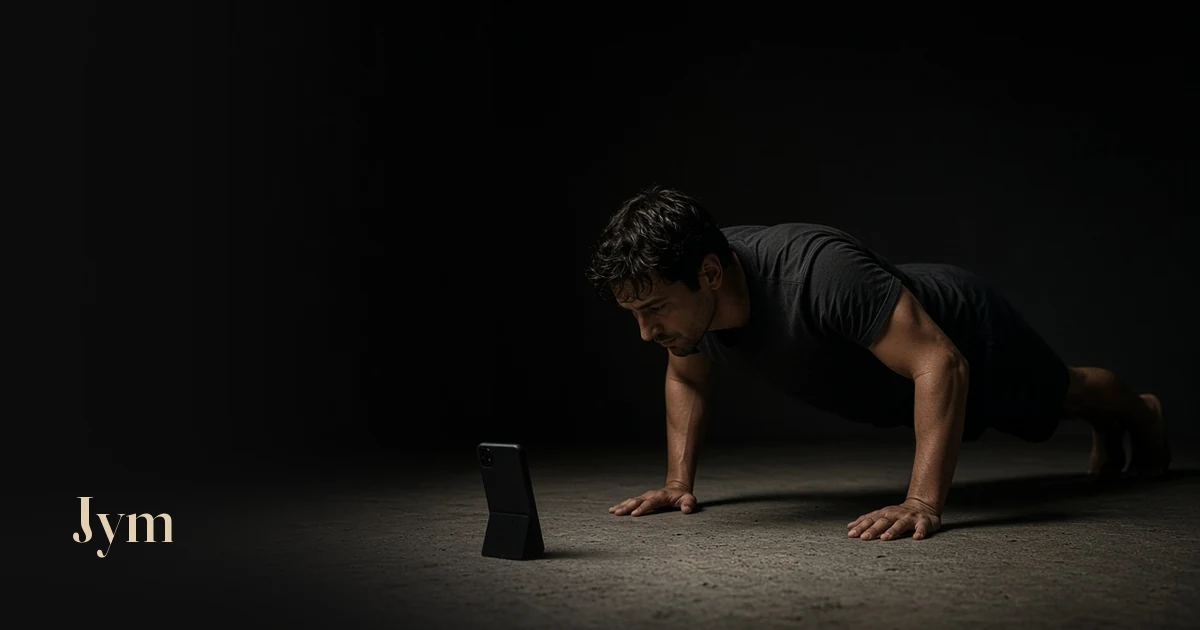
You do twenty push-ups, sit back on your heels, and the screen says twelve. It's tempting to blame the counter. Most of the time, though, it simply couldn't see you: your feet were out of shot, the window behind you turned you into a shadow, or the phone slid flat halfway through.
Placement is the dull part of camera counting, and it decides whether the number means anything. Get it right once and every set after is easier to trust.
The short version
- Phone on the floor, you facing it, a short way in front of your hands.
- Tilt it up and prop it against something steady.
- Get your whole body in frame, head to feet.
- Wait for the skeleton to turn green before your first rep.
Why placement matters so much
A camera counter doesn't feel your reps. It sees them. A pose model looks at each frame and estimates where your joints are. Google's MediaPipe Pose Landmarker, for example, tracks 33 body landmarks, such as shoulders, elbows, wrists, hips and ankles.
Jym follows the angle at your elbows and counts a rep when you go from straight arms, down, and back up to straight arms. It also watches your hips, depth, lockout, head position and shoulders. If a joint is out of frame, in shadow or hidden, the model has less to go on, and that's when reps get missed. How an AI push-up counter works has the detail.
On the floor, in front of you, tilted up
Phone on the floor, you facing it, a short way in front of your hands. Then tilt the phone up so the lens looks back along your body rather than at the ceiling.
You don't need a stand. A book, a shoe or a water bottle works, as long as the phone stays steady.
Two places that don't work well:
- Your hand. You need both hands for the push-up, and a moving camera makes tracking harder.
- A chair or sofa. The higher the phone, the more it looks down on the top of your head and back, rather than along your body.
Get your whole body in frame
Step back into frame until the camera can see all of you, head to feet. Then check both ends of the movement.
- At the top, with straight arms, your head is at its highest. Make sure it doesn't leave the top of the frame.
- At the bottom, your chest is close to the floor. Make sure your hips and feet are still in view.
A quick test: get into position, hold the top of a push-up for a second and glance at the screen. If you can see your hands, head, hips and feet, you're set.
Wait for the green skeleton
Jym draws a skeleton over your body. It goes green when Jym has locked on, and counting starts after that. If you start your set early, those first reps can be missed.
If Jym loses you mid-set, it tells you, and the count so far is kept. Keep going, or tap Add a rep for any it missed. You can remove a rep too. Challenges only use reps the camera counts, so placement matters most on challenge days.
Light, clothes and space
- Face the light. A bright window behind you turns you into a silhouette, and joints are harder to find. Put the window or lamp behind the phone instead.
- Light up a dim room. If Jym asks for more light, switch on a lamp or move nearer a window.
- Watch the contrast. Dark clothes on a dark floor make the camera work harder. A lighter top or a mat helps.
When the count still looks wrong
Rep counts and form notes can be wrong: lighting, the camera angle and how you're framed all affect them. Most problems have a simple fix.
- The skeleton never goes green. Step back until your head and feet are in view, add light, and check the phone is tilted up rather than lying flat.
- Reps go missing. Check that your whole body stays in frame at the bottom of each rep, and go all the way down and back up to straight arms. A "Short range" or "No lockout" note means the rep stopped short.
- The count stops mid-set. You've probably moved out of shot, or the light has changed. Keep going, and use Add a rep if you need to.
- Form notes you don't recognise. Make sure the phone faces you straight on, not from off to one side. If the note still appears, it may be telling you something. 8 push-up form mistakes covers what each one means.
Same spot, every time
Once a spot works, keep it. The same floor, distance and light make your log easier to compare from day to day. A strip of tape where the phone goes saves setting up each morning.
Not sure a camera counter is right for you? Push-up counter apps compared weighs it against tap, sensor and wrist counters. For a full first set, start with how to count push-ups with your phone camera, or see the push-up counter page. Jym is free for 48 hours after you sign in, then Pro $6/mo.
Questions
Where should I put my phone to count push-ups?
On the floor, you facing it, a short way in front of your hands, tilted up enough to see your whole body, head to feet. Wait until the skeleton turns green, then start your set.
Do I need a phone stand?
No. Prop the phone against a book, a shoe or a water bottle so it stays steady and tilted up.
Why is my push-up counter missing reps?
Usually the camera can't see you clearly. Step back so your whole body stays in frame, face the light, and go all the way down and back up to straight arms.
What happens if Jym loses me mid-set?
It tells you, and the count so far is kept. Keep going, or tap Add a rep for any it missed. Challenges only use reps the camera counts.
This article is general information, not medical advice. If you have pain, an injury or a health condition, check with a professional before starting a new exercise routine.